
Selecting the right soldering tools for electronics determines whether a delicate circuit board survives a repair or ends up permanently stripped of copper traces. Modern microelectronics feature compact surface-mount devices, miniature ball grid arrays, and heat-sinking ground planes that quickly drain thermal energy away from work joints. Technicians cannot rely on uncalibrated heating elements or uncontrolled direct-heat irons when handling sensitive silicon dies. Success requires a coherent benchtop ecosystem that balances calibrated heat delivery, active electrostatic discharge protection, reliable mechanical fixturing, and chemically active flux systems to achieve repeatable, factory-grade solder joints across diverse electronic architectures.
Restrictions such as RoHS drove wider adoption of lead-free alloys like SAC305 and tin-copper formulations across many covered products and markets, though leaded solder remains in use for some applications outside those regulatory scopes. This material shift raised the thermal demands placed on hand-soldering equipment at many rework stations. Traditional tin-lead solders melt near 183°C, but typical lead-free alloys require a liquidus threshold between 217°C and 227°C.
This elevated melting point narrows the safe margin between achieving intermetallic bonding and scorching the underlying epoxy glass substrate. When a technician solders a joint tied directly to an internal copper ground plane, that massive sheet acts as a passive radiator, pulling thermal energy away faster than standard heating elements can supply it. If a heating iron exhibits slow thermal response, the tip temperature plunges below the liquidus point.
Technicians facing cold solder joints often turn dial temperatures up to extreme levels, which can lead to damaged components. Higher tip temperatures and longer exposure times can accelerate oxidation of the protective plating on soldering tips and degrade chemical flux before it finishes cleaning the joint, with the exact rate depending on the tip, flux, and conditions involved. Responsive temperature control can help compensate for this kind of heat loss by supplying extra power as the tip touches a large thermal mass, though it does not by itself guarantee that overshoot will never occur.
Thermal shock represents only half the danger when rebuilding modern printed circuit boards. Delicate semiconductors, including radio-frequency transceivers, microcontrollers, and low-voltage field-effect transistors, remain vulnerable to subtle electrical overstress. Electrostatic discharge sensitivity varies considerably by device and by the test model used to characterize it, such as the human body model or charged device model, and even a discharge well below levels a person can feel may puncture thin gate oxides inside certain silicon dies, producing latent defects that evade initial quality checks.
ANSI/ESD S20.20 describes a framework for an ESD control program, covering elements such as grounding, personnel protection, and handling procedures across a defined work area. Rather than citing a single shared-grounding figure, technicians should verify their workstation grounding, tool resistance, and tip-to-ground requirements against the standard itself and against the documentation for the specific soldering station and tools in use. Reliable rework gear is generally built around grounded tip-to-ground paths intended to protect live silicon from damaging voltage transfer.
Uneven or excessive heating during rework can contribute to thermal cracking in some multi-layer ceramic capacitors, since these components can be sensitive to rapid or uneven temperature changes near their terminations. The extent and visibility of any resulting damage depends on the component and the specific thermal exposure involved, so this risk is best treated as a reason to control dwell time and heat input rather than as a predictable, universal failure pattern. Employing careful thermal control helps protect the functional lifespan of modern micro-assemblies.
Unregulated soldering irons deliver constant power without monitoring or adjusting their tip temperature in response to load changes. While these tools can fuse thick electrical wiring or coarse terminals, they generally lack the responsiveness needed for multi-layer micro-soldering tasks where thermal load varies. Fine-pitch work or joints on boards with heavy thermal mass often benefit from temperature-controlled stations or irons that adjust power output in response to actual tip conditions.
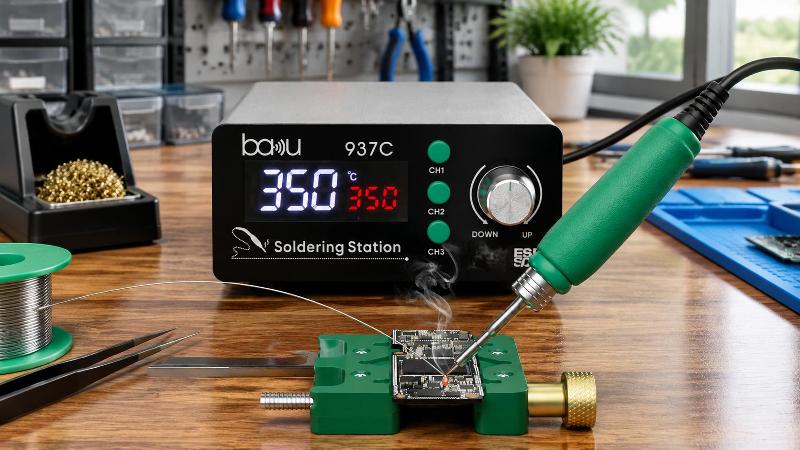
Temperature-controlled soldering stations may use a sensor positioned at or near the tip or cartridge, feeding live data back to the station’s control circuitry so it can adjust power output as conditions change. The exact sensor location and control method vary by station design and manufacturer. According to its product specifications, the BA-937C soldering station delivers temperature stability of ±1℃, displaying real-time metrics on an LED digital display to reduce guesswork during intricate trace repairs.
Preset channel buttons allow operators to switch rapidly between specialized temperature windows without taking their eyes off the microscope. The heating iron should feature an ergonomic handle that keeps the technician’s fingers close to the joint while insulating against heat. This fine physical control minimizes hand fatigue during extended rework sessions on high-density circuit assemblies.
A capable soldering iron station requires the proper tip geometry to transfer thermal energy efficiently. Technicians often mistakenly use needle-thin conical tips for every fine task, assuming small dimensions guarantee precision. In reality, a thin conical tip offers very little surface contact area, creating high thermal resistance that stalls heat transfer onto copper pads.
Matching the tip profile to the contact area of the pad maximizes heat transfer via conduction rather than excessive dwell time. Technicians can set lower baseline station temperatures, reducing oxidation rates and prolonging the working life of the iron tip.
The efficiency of heat recovery defines how well a soldering station handles challenging microelectronic joints. When a tip touches room-temperature copper, thermal energy flows outward according to the temperature delta and contact resistance. High-density motherboards with heavy ground planes absorb thermal energy rapidly, dropping the tip temperature within milliseconds.
A station’s sensor placement and control response largely determine how quickly it compensates for this kind of heat loss. Thermal recovery performance varies by station design, so it is worth checking the specific model’s documentation or testing its behavior under realistic thermal loads. Stations that restore power to the tip sooner can support shorter dwell times, while those that react more slowly may force the operator to wait while the tip reheats directly against the circuit board. This extended dwell time risks separating delicate adhesive copper traces from the underlying laminate board.
Keeping dwell time as short as practical, while still achieving proper wetting, helps reduce the risk of pad lifting or trace damage on delicate boards. The exact safe limit depends on the joint, the tool, and the board construction, so technicians should follow component and process guidance rather than a fixed universal cutoff. Stations engineered for rapid thermal recovery support shorter dwell times and help protect the physical integrity of circuit boards during demanding component replacements.
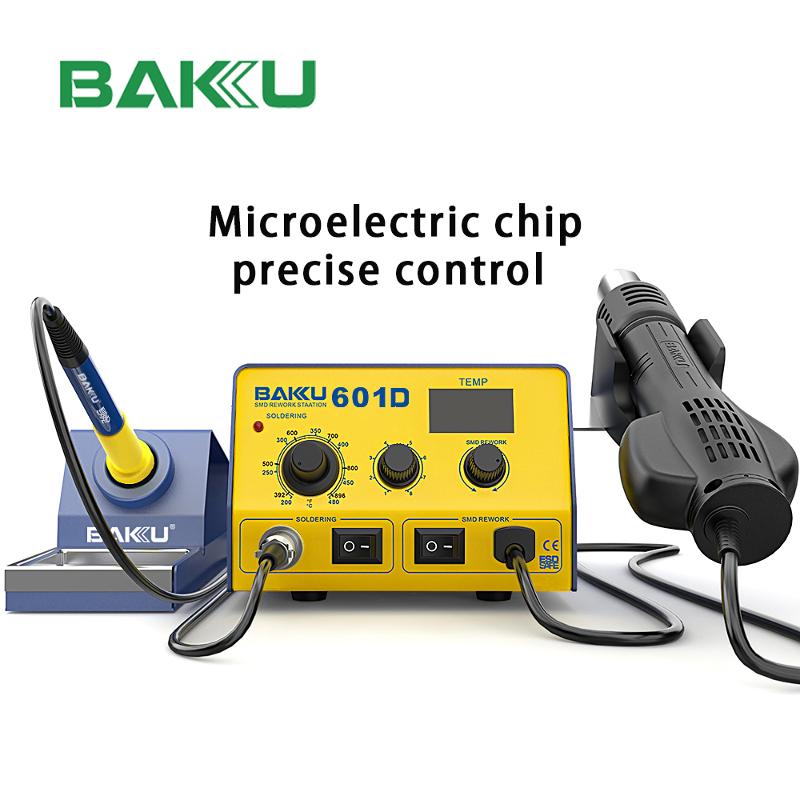
Surface-mount multi-pin arrays and bottom-terminated components like ball grid arrays require non-contact heating across all contact surfaces at once. Direct iron tips cannot reach solder joints tucked beneath an integrated circuit body. A closed-loop hot air rework station addresses this challenge by directing heated airflow over the entire component area.
Precise airflow control is just as important as temperature regulation during hot air rework procedures. An excessively strong blast of air can blow adjacent passive parts right off their molten solder pads. Conversely, weak airflow fails to deliver the required thermal energy, causing prolonged baking cycles that risk warping the mainboard substrate.
According to the supplied product specifications, Baku’s rework equipment lists an airflow capacity of up to 120L/min. Technicians should confirm the available adjustment range and low-flow capability directly with the specific station’s documentation before relying on it for delicate low-velocity work, since a maximum figure alone does not describe the full operating window. Within whatever range a given station supports, lower airflow settings are generally preferred for small surface-mount devices, while higher settings suit larger shielded covers or high-pin-count processors on multi-layer ground planes.
Heat serves as the catalyst, but chemical agents govern the ultimate metallurgical quality of every solder connection. Atmospheric oxygen attacks heated metals immediately, creating non-conductive oxides on copper lands and component leads that block proper solder wetting. Flux agents chemically strip these surface oxides while reducing surface tension across the molten solder pool.
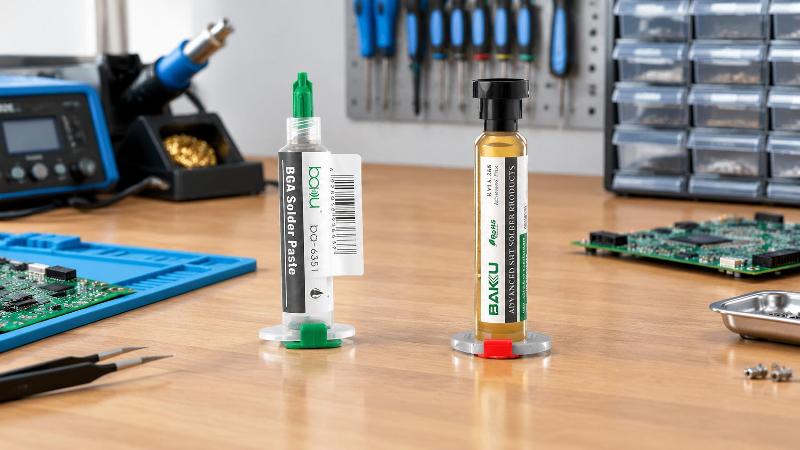
Reworking ball grid arrays generally calls for a dedicated flux formulation paired with a compatible solder paste, since different flux chemistries vary in residue behavior and in how well they hold up through repeated heating cycles. Technicians should check a given flux or paste against its own technical data sheet before relying on it for a BGA rework task, since formulation properties differ by product and manufacturer.
Baku’s lineup includes a two-part solder paste and flux kit supplied as a BGA solder paste tube and a separate flux tube, as shown in the product imagery. The general working principle of such a kit is that flux activates first to strip oxides from the pads, allowing the solder alloy to merge into a joint as it melts, though the specific viscosity, residue classification, and particle characteristics of this kit are properties to confirm against its own technical data sheet rather than assume from general industry norms.
Performing microscopic rework without solid mechanical fixturing introduces unnecessary risk to precision electronics. Hand tremors or unexpected movements during a hot air reflow cycle can misalign molten solder spheres, causing bridging underneath an integrated circuit. Thin smartphone logic boards also tend to warp unevenly when exposed to localized rework temperatures.
Professional fixturing platforms address these stability issues with dedicated clamping channels and balanced structural weight. According to Baku’s technical specifications, its repair fixtures integrate toughened glass panels rated to withstand temperatures up to 500°C. A mechanical clamping span of 10-72mm securely holds diverse assemblies, from smartwatches to tablets.
A smooth 360-degree rotating base allows technicians to pivot the workpiece under an optical microscope without unsecuring the board. This rotational freedom lets the operator maintain comfortable hand angles when working around tall shield walls and crowded components. Stable fixturing minimizes the physical stress placed on circuit boards throughout intense thermal cycles.
Reaching the damaged circuit board requires opening tight external enclosures and removing fragile internal brackets. Today’s consumer electronic devices rely on tight friction clips, internal adhesive strips, and microscopic fasteners. Forcing these enclosures open with crude tools can bend internal battery packs or sever delicate flexible printed circuits.
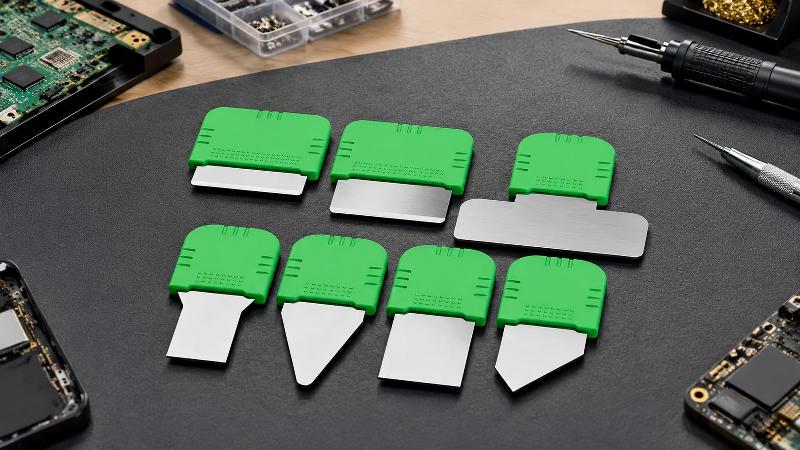
A 7-in-1 multifunctional pry set with blade thicknesses between 0.1mm and 0.2mm allows operators to slip into razor-thin seams without marring exterior surfaces. Textured, anti-slip silicone handles give technicians fine control when separating tight display assemblies. The set’s thin stainless-steel blades are designed to work through adhesive-bonded seams, though technicians should still apply steady, careful pressure around flex cables to avoid puncturing them.
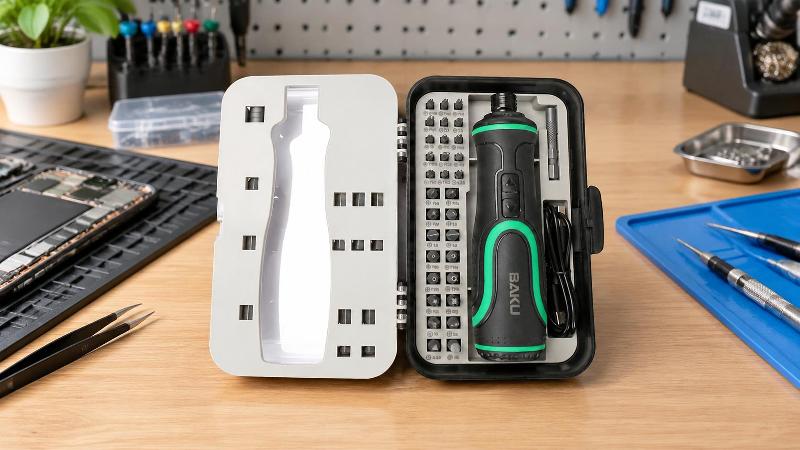
Once inside the device chassis, technicians encounter an array of micro-fasteners, including Torx, Pentalobe, Tri-point, and Phillips styles. A comprehensive 41-in-1 electric screwdriver set provides the correct bit geometry to help prevent stripped screw heads during disassembly. The set’s magnetic bits help keep small fasteners seated on the driver during use, rounding out a dependable, clean workstation setup.
Equipping an electronics workstation requires selecting tools that match the specific micro-soldering tasks you handle. The following matrix outlines the core equipment tiers, drawing only on the specifications supplied for this product collection, along with their typical repair workloads. Some features are listed at the collection level rather than confirmed for every individual model, so it is worth checking a specific station’s documentation before purchase.
| Equipment Class | Key Technical Parameters | Primary Mechanical & Thermal Features | Target Electronic Applications |
|---|---|---|---|
| Precision Contact Station | Temp Stability: ±1℃; LED Readout | Collection-level features include ESD-safe design, constant-temperature heating technology, overload protection, and auto-sleep function | Fine-pitch SMD point work, micro-jumper traces, connector replacement |
| Hot Air Rework Equipment | Airflow Capacity: up to 120L/min | Adjustable airflow delivery; designed for non-contact component heating | BGA de-soldering, QFN reflow, IC package extraction, shielding removal |
| Thermal Rework Fixture | Clamping Range: 10–72mm; Heat Resistance: 500℃ | Toughened glass clamping surface; 360° rotating base | Multi-layer smartphone motherboards, micro-modules, tablet logic units |
| Precision Mechanical Kit | Bit Count: 41-in-1 bits; Blade Thickness: 0.1–0.2mm | Ergonomic silicone grip handles; magnetic bit retention; flexible pry edges | Housing separation, bracket disassembly, display detachment, battery swaps |
Selecting equipment that aligns with your specific workload avoids costly over-specification while ensuring the thermal capacity needed for complex repairs. Baku provides professional soldering equipment and precision tools for the inspection and repair of electronic devices such as computers and mobile phones. Whether you need universal repair equipment or customized special repair tools, we can meet your needs and provide related solutions, drawing on more than 20 years of technical experience in the electronics repair industry.
Navigating the market for soldering equipment requires looking past basic aesthetic features and marketing claims. When evaluating stations and tools as part of a broader ESD control program, consider the following equipment-specific checks. These criteria address tool selection only; establishing a complete ESD Protected Area also requires evaluating personnel grounding, work surface controls, and other program elements according to the relevant standard, such as ANSI/ESD S20.20.
Verify electrical safety and grounding architecture: check the station’s grounding path and tip resistance against both the manufacturer’s documentation and the relevant ESD control program requirements, since specific resistance limits can vary by standard and by equipment type.
Evaluate thermal recovery behavior rather than baseline wattage alone: ask for information on how the station’s sensor and heater respond when the tip contacts a large thermal mass, such as a multi-layer ground plane, since high wattage without responsive feedback can still lead to temperature overshoot or lag.
Inspect the availability and construction of replacement tips: check the specific model’s tip specifications to confirm their construction. Many tips use a copper core with iron plating on the working area and chrome on non-wetting areas, but the exact structure and plating quality varies by manufacturer and product line.
Review automated safety features and sleep profiles: check that the hot air and iron stations include auto-sleep functions. These lower temperatures during idle periods, saving power and slowing tip oxidation over long shifts.
Following this systematic selection process helps technicians invest in durable equipment that protects both their bottom line and their workpieces. A well-designed workstation minimizes costly board failures and delivers consistent results across complex repair tasks.
Clean joint preparation forms the foundation of every durable microelectronic solder connection. Begin by securing the target printed circuit board into the rotating motherboard fixture, adjusting the sliding metal brackets across the 10-72mm range until the board sits firmly without flexing. Position the work area under an inspection microscope to examine the target components for physical damage, cracked solder fillets, or corroded pads.
Apply a controlled bead of syringe-dispensed flux over the component pins. The flux creates a protective barrier over the metal leads, helping limit atmospheric oxygen from forming surface oxides during the initial heating phase. Make sure nearby heat-sensitive components, such as plastic connectors, cameras, and flex cables, are shielded with polyimide tape or heat-deflecting metal shims.
Setting the correct temperature depends heavily on the specific circuit board, the solder alloy, the tip geometry, and the station itself, so any figure given here should be treated only as a possible starting point rather than a fixed rule. For modern lead-free assemblies like SAC305, some technicians begin in a range somewhat above the alloy’s 217°C melting point to offset the heat sinking of copper ground planes, then adjust from there based on how the joint actually responds.
The general practice is to select the lowest iron or air temperature that still reliably wets the joint within a short dwell time, following the equipment manufacturer’s guidance and the component’s own handling limits where available. When using hot air for surface-mount components or small chips, airflow and temperature settings should be chosen to suit the specific nozzle, board thermal mass, and component sensitivity, and ideally confirmed by monitoring the actual workpiece temperature rather than relying on a single universal setpoint. Keep the air nozzle moving in smooth circles around the component perimeter to help distribute heat evenly and avoid localized hotspots on the board.
Watch the solder joints under the microscope until the alloy shifts from a dull matte to a reflective, liquid state. Once the solder liquefies completely, lift the component vertically using anti-magnetic ESD-safe tweezers. Never force or pull a component off the board before its solder has fully melted, as doing so can rip delicate copper pads away from the underlying laminate.
Once the chip is clear, apply fresh flux across the remaining solder pads and clean the surface using copper desoldering braid. Place the braid over the irregular solder bumps, lay the flat edge of a chisel or bevel tip over the braid, and let capillary action draw the molten solder into the copper weave. Glide the braid gently across the pads without downward pressure to avoid scratching the protective solder mask.
Clean the prepared pads with a cleaner compatible with the specific flux used, following that flux’s own technical data sheet, since cleaning effectiveness varies with the flux chemistry and how far the residue has carbonized. Check that each copper land is flat and smooth once cleaned. Where the rework process calls for flux alone, apply a compatible flux across the footprint; where the process specifies controlled solder deposition, apply BGA solder paste using a fine spatula and an appropriate stencil or deposition method rather than treating paste and flux as interchangeable. Align your replacement integrated circuit using the silk-screen corner guides and board orientation markers.
Tack the corner pins with a fine soldering tip, or reflow the entire package using your hot air station until surface tension pulls the chip into alignment over the pads. Allow the board to cool naturally so the solder can form a solid, uniform joint structure. Finally, inspect the finished joints under magnification, checking for an even fillet shape with proper wetting coverage across each pad and no bridging shorts between adjacent pins, keeping in mind that lead-free SAC alloys can have a duller or slightly grainier surface than tin-lead solder even in a sound joint, so appearance alone should not be the only pass criterion.
There is no single ideal temperature that applies to every joint, since the right setting depends on the solder alloy, tip geometry, board thermal mass, and station design. For lead-free alloys, which generally melt between 217°C and 227°C, many technicians start somewhat above that range and then adjust toward the lowest setting that still produces reliable wetting within a short dwell time. Running well above what the joint actually needs tends to accelerate flux degradation and raises the risk of damaging circuit board pads, so it is worth treating any specific number as a starting point rather than a fixed target.
Modern microchips feature ultra-thin internal oxide layers, and electrostatic discharge sensitivity varies by device and by the test model used to characterize it. Non-grounded soldering irons can build up electrostatic charge or allow stray current to reach sensitive circuit traces through their metal tips. Using tools designed around the principles in an ESD control program, such as the framework described in ANSI/ESD S20.20, and verifying grounding against both the standard and the equipment’s own documentation, helps reduce the risk of component damage during repairs.
Soldering flux is a purely chemical agent that strips metal oxides, lowers surface tension, and blocks atmospheric oxygen during the heating cycle. Solder paste combines a flux vehicle with solder alloy particles suspended in it, with the exact particle size and flux ratio varying by product. Technicians use liquid or gel flux when desoldering and drag-soldering, while solder paste is better suited to stenciling fresh solder deposits onto bare pads during chip replacement, and the two should not be substituted for each other in a process that specifically calls for one or the other.
When a soldering tip touches an expansive internal ground plane, the copper quickly pulls heat away from the contact point. A station that responds slowly to this heat loss may tempt a technician to push down harder or dwell longer on the joint to compensate. A station with a more responsive heater and sensor can restore tip temperature sooner, which supports shorter dwell times and may reduce the risk of the pad separating from the board, though technique and fixturing still play a significant role.
To help extend the life of soldering tips, many technicians clean them using coiled brass wire instead of damp cellulose sponges, since repeated thermal shock can wear down the tip’s iron plating over time. Keeping tips coated with a layer of fresh solder whenever resting in the stand helps block atmospheric oxygen from attacking the core. Using the station’s auto-sleep mode to lower idle temperatures between repairs, and avoiding abrasive files that strip the protective outer plating, also supports longer tip life.
Successful microelectronic repairs depend on using an integrated suite of tools designed to manage the physics of modern circuit assemblies. High-density motherboards, lead-free alloys, and delicate surface-mount devices call for equipment that delivers reliable heat control, robust electrostatic protection, and stable mechanical fixturing. Investing in dependable soldering tools for electronics protects delicate circuits and, when paired with sound process and technique, can support consistent, higher-quality repair outcomes.

Soldering Tools for Electronics: The Complete Engineering Guide to Precision Rework
Precision electronics rework demands temperature-controlled soldering stations, ESD-safe tools, proper tip geometry, and flux chemistry to prevent board damage.

Technical Guide to Electronic Soldering Equipment: Thermal Dynamics, Architecture, and Selection Fra
Choosing precision soldering equipment involves balancing heating methods, thermal control, ESD protection, and auxiliary tools for reliable board-level rework.

Digital Microscope Guide for Electronics Repair and Precision Soldering
Choosing a digital microscope for electronics repair means balancing optical zoom, working distance, latency, lighting, and bench stability for accurate rework.

The Engineering Guide to Soldering Equipment: Precision Bench Architecture and Microelectronics Rewo
Choosing soldering equipment with precise thermal control, ESD safety, and proper fixtures reduces board damage and improves rework reliability.

Choosing the Right Electronic Repair Equipment for Professional Service Centers
Professional electronic repair equipment including soldering stations, rework fixtures, and precision tools enables efficient, high-quality device repairs in service centers.
Stereo Microscope Price Guide: What Affects the Cost?
Discover what affects the price of a stereo microscope, including magnification, optical quality, digital features, lighting systems, and build materials. Learn how to choose the right model for electronics repair and precision inspection.

STAY CONNECTED